
Read a date from a visitor pass and localize the field for review.
Input and workflow
Inspect the region and date together. Show the crop beside the selected value when a reviewer checks the field. Keep an unreadable option for blurred or cut-off dates.
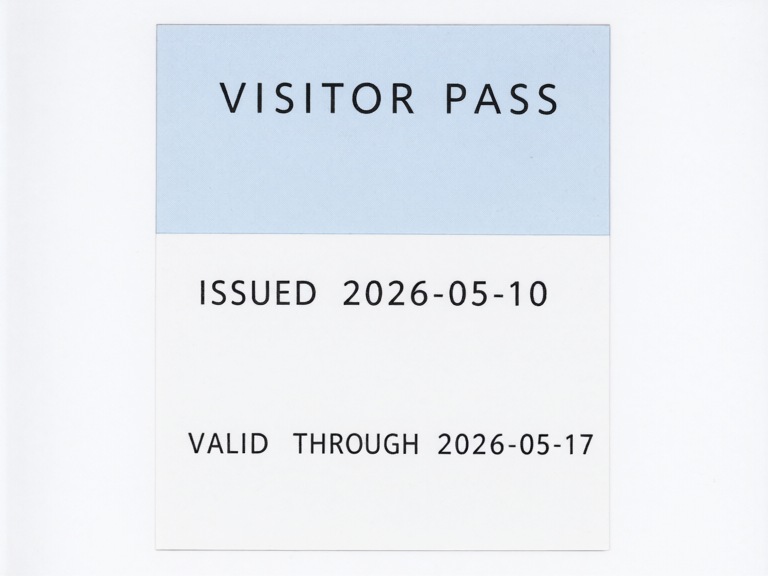
<visitor_pass>. Download input image- Locate the fieldRun Box on the original scan to find the valid-through date.
- Read the valueChoose among plausible dates and an unreadable option.
- Review the evidenceShow the original field beside the normalized date before storing it.
Request
{
  "model": "ngila-judge",
  "state": {
    "scan": "<visitor_pass>",
    "field": "expiry date"
  },
  "questions": {
    "region": {
      "type": "box",
      "instructions": "Locate the valid-through date on <visitor_pass>."
    },
    "expiry": {
      "type": "choice",
      "instructions": "Select the date labeled as the expiry.",
      "criteria": {
        "2026-05-10": "",
        "2026-05-17": "",
        "unreadable": ""
      }
    }
  },
  "assets": {
    "<visitor_pass>": {
      "type": "image",
      "format": "jpg",
      "data_base64": "<base64-encoded JPEG>"
    }
  }
}Run locally
Save ngila.py alongside your script and set NGILA_API_KEY. Save any linked input images in the same directory.
import base64
import json
from pathlib import Path
from ngila import NgilaClient

state = {'scan': '<visitor_pass>', 'field': 'expiry date'}
questions = {'region': {'type': 'box',
            'instructions': 'Locate the valid-through date on <visitor_pass>.'},
 'expiry': {'type': 'choice',
            'instructions': 'Select the date labeled as the expiry.',
            'criteria': {'2026-05-10': '', '2026-05-17': '', 'unreadable': ''}}}
files = {'<visitor_pass>': 'docs_visitor_pass.jpg'}
assets = {
    ref: {
        "type": "image",
        "format": "jpg",
        "data_base64": base64.b64encode(Path(filename).read_bytes()).decode("ascii"),
    }
    for ref, filename in files.items()
}

response = NgilaClient().system_one(state, questions, assets=assets)
a = response["answers"]
print(json.dumps(a, indent=2, ensure_ascii=False))
Use the answers
The following application fragment uses a = response["answers"]. Supply any thresholds, lookup tables, or previous results from your workflow before applying it.
value = a["expiry"]["choice"]
needs_rescan = value == "unreadable"