
Locate a product label and check an OCR hypothesis against its image.
Input and workflow
Overlay the box on the source image, then inspect the cropped region. A high text score on a different bottle still needs manual review.
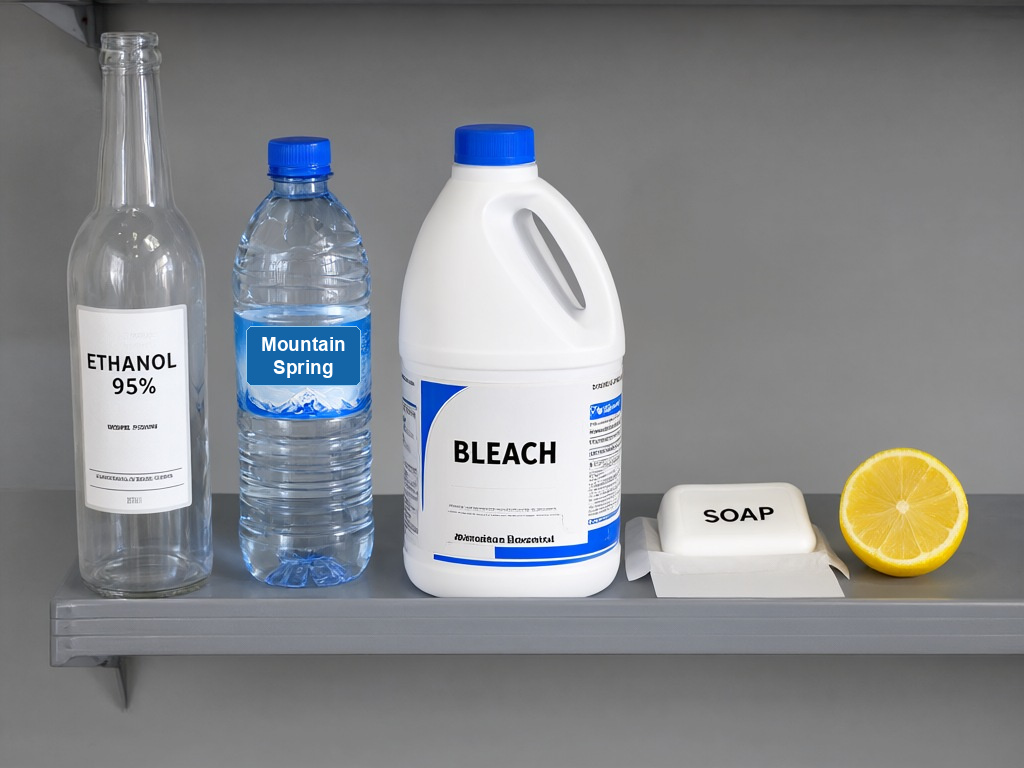
<shelf_liquids>. Download input image- Keep the OCR hypothesisRecord the extracted value and its source image.
- Find and verify the regionAsk Box for the label and Noul whether the OCR string is visible.
- Review weak resultsInspect the crop against the original sheet. Preserve the original text for audit.
Request
{
  "model": "ngila-judge",
  "state": {
    "photo": "<shelf_liquids>",
    "ocr": "Mountain Spring"
  },
  "questions": {
    "label": {
      "type": "box",
      "instructions": "Locate the water bottle label in the photo."
    },
    "supported": {
      "type": "noul",
      "instructions": "Can the OCR text be read on the water bottle label?"
    }
  },
  "assets": {
    "<shelf_liquids>": {
      "type": "image",
      "format": "jpg",
      "data_base64": "<base64-encoded JPEG>"
    }
  }
}Run locally
Save ngila.py alongside your script and set NGILA_API_KEY. Save any linked input images in the same directory.
import base64
import json
from pathlib import Path
from ngila import NgilaClient

state = {'photo': '<shelf_liquids>', 'ocr': 'Mountain Spring'}
questions = {'label': {'type': 'box',
           'instructions': 'Locate the water bottle label in the photo.'},
 'supported': {'type': 'noul',
               'instructions': 'Can the OCR text be read on the water bottle '
                               'label?'}}
files = {'<shelf_liquids>': 'shelf_liquids.jpg'}
assets = {
    ref: {
        "type": "image",
        "format": "jpg",
        "data_base64": base64.b64encode(Path(filename).read_bytes()).decode("ascii"),
    }
    for ref, filename in files.items()
}

response = NgilaClient().system_one(state, questions, assets=assets)
a = response["answers"]
print(json.dumps(a, indent=2, ensure_ascii=False))
Use the answers
The following application fragment uses a = response["answers"]. Supply any thresholds, lookup tables, or previous results from your workflow before applying it.
bounds = a["label"]["box"]
review = min(a["label"]["confidence"], a["supported"]["noul"]) < threshold